Structured knowledge systems: Notion + Obsidian
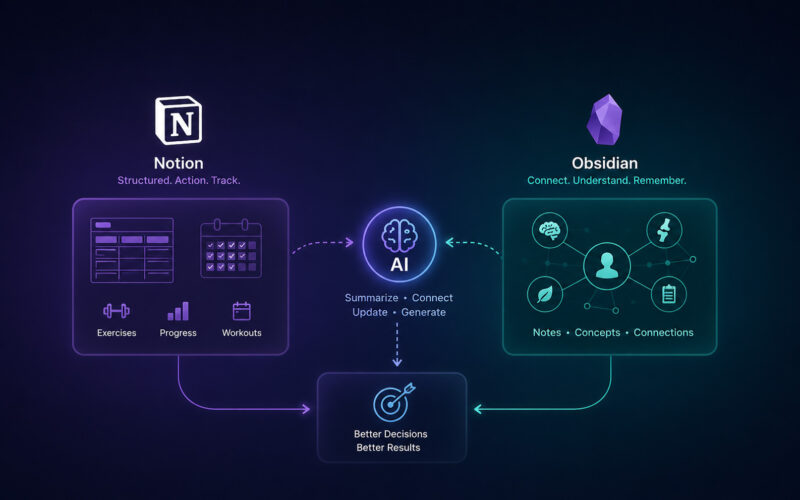
Built a Notion and Obsidian health knowledge system for workouts, exercise references, body-mechanics notes, and reusable long-term learning.
Digital Tools & Systems
Built a local Bambu Studio dashboard to review filament presets, compare calibration values, flag near-duplicates, and track K / Flow Dynamics records.
As my 3D printing setup became more capable, the filament-management side became harder to trust. Bambu Studio stores filament presets, process profiles, printer settings, AMS material assignments, and K / Flow Dynamics calibration data in ways that are useful to the software but not always clear to the person trying to maintain a consistent setup.
The practical problem was simple: with multiple nozzle sizes, standard and high-flow hotends, left and right toolheads, and many filament presets, it became difficult to answer which values were actually calibrated and which ones were inherited defaults.
I started building a local calibration-management dashboard to make that information visible. The tool scans Bambu Studio filament preset files, pulls out the settings that matter most, and presents them in a searchable dashboard. It can compare profiles side by side, highlight meaningful differences, and help identify near-duplicate presets that should probably be cleaned up or consolidated.
A key part of the work was tracking K / Flow Dynamics values. Instead of relying only on Bambu Studio’s less visible printer-side calibration records, the tool stores calibration notes in a structured block inside the existing filament notes field. That keeps the information close to the filament profile, makes it human-readable, and preserves any notes that were already there.
The dashboard focuses on the settings that affect real printing decisions: flow ratio, maximum volumetric flow, temperatures, cooling, nozzle and hotend context, and calibration values. The goal is not to replace Bambu Studio, but to make its preset data easier to audit and maintain.
I built the first version in Python with a Streamlit interface so it could be tested quickly on macOS and Windows. Because the tool edits local preset files, I treated safety and reversibility as part of the design. Before writing changes, it creates backups, validates the JSON files, and logs what changed so the workflow is easier to trust.
This is a personal tooling project, but it reflects a broader process-improvement pattern: when a system becomes too complex to manage reliably by memory, make the important information visible, comparable, backed up, and easier to maintain.
Related
A few related projects with the same kind of problem-solving thread.
Built a Notion and Obsidian health knowledge system for workouts, exercise references, body-mechanics notes, and reusable long-term learning.
Digital Tools & Systems
I built a personal knowledge and fitness organization system using Notion and Obsidian to make health, training, and body-mechanics information easier to capture, structure, and reuse. Notion became the structured database layer for workouts and exercise records, while Obsidian became the connected knowledge base for health, anatomy, movement, recovery, supplements, and body-mechanics notes.
The original trigger was a fitness challenge that provided an exercise schedule, but I wanted more than a static list of workouts. I wanted to track weights and reps, reuse exercises in future routines, attach notes, add links and videos, and build a system that could evolve as my understanding improved.
In Notion, I created a structured fitness database with separate areas for workouts and exercises. The exercise library acts as the stable reference layer, where each exercise can hold notes, links, videos, technique cues, and future updates. Workout routines can then reference those exercises without duplicating information.
In Obsidian, I use a separate health knowledge base for connected notes about the body, movement, recovery, supplements, and related concepts. The two tools serve different jobs: Notion handles structured tracking and reusable records, while Obsidian handles connected learning and reference material.
The application is personal, but the pattern transfers: identify the friction, design a structure, separate stable reference information from changing logs, and build a workflow that can improve over time instead of disappearing into scattered notes.
Built a Trello-based maintenance system for recurring inspections, site knowledge, work history, subcontractor follow-up, and automated reporting across commercial properties.
Digital Tools & Systems
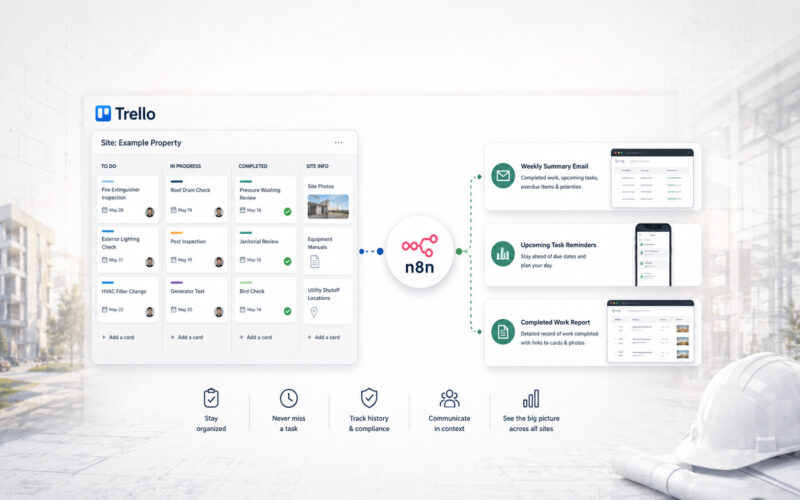
At Pentillion Construction, I implemented a Trello-based maintenance management and reporting system for recurring work across a dozen commercial properties. The system replaced phone calls, personal notes, and memory-based tracking with site-specific boards, recurring templates, photo documentation, manuals, procedures, accountability labels, and automated n8n reporting.
Built a shared fitness challenge that pulls Garmin activity data into Google Sheets, calculates weekly standings and penalties, and sends automated daily updates for a playful date-night accountability system.
Digital Tools & Systems
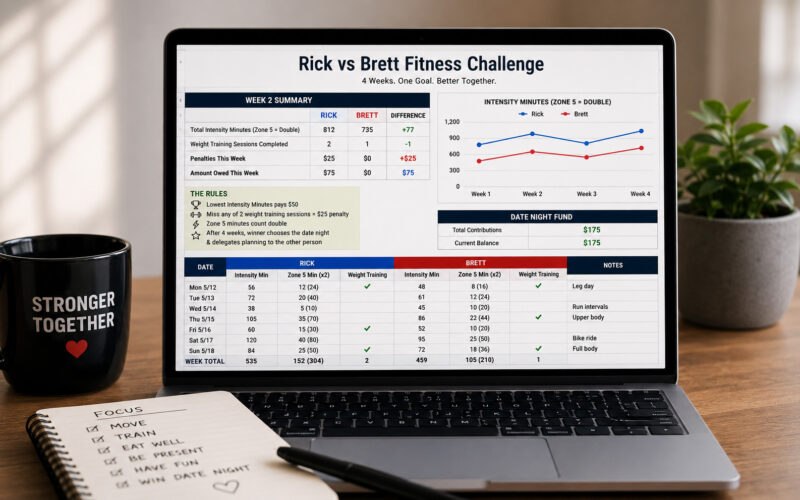
My wife and I wanted a fun way to stay accountable with our fitness goals, so I built a shared challenge using Garmin data, Google Sheets, and automated daily emails. The system tracks intensity minutes, doubles Zone 5 training, applies weight-training penalties, and keeps a running scoreboard for a date-night fund.
The challenge is simple enough to understand without needing the spreadsheet open. Each week, the person with the fewest Garmin intensity minutes contributes $50 to the date-night fund. Zone 5 training minutes count double, and each person is expected to complete two weight-training sessions per week. Missing one adds another $25. After four weeks, the winner chooses the date night and can delegate the planning to the other person.
The system only works if tracking does not become another chore, so I automated the boring parts. Scripts pull activity data from Garmin, sync it into Google Sheets, backfill historical activity, calculate weekly standings, apply the rules, and send a daily email showing who is ahead, who is behind, and what still needs to happen before the week ends.
No more skipping leg day. I wanted motivation to feel visible and playful. The shared date-night fund makes the consequence positive, the daily email keeps the challenge present without manual checking, and the spreadsheet keeps the rules transparent. The automation reduces enough friction that the habit becomes easier to keep doing.