3D printing filament calibration dashboard
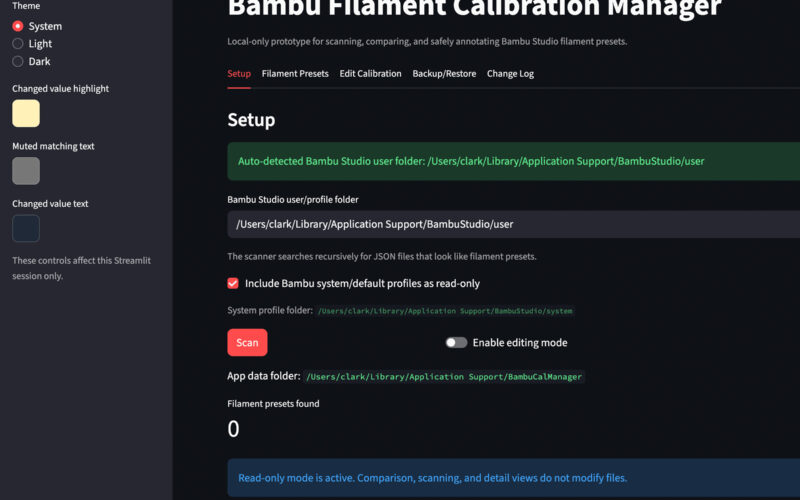
Built a local Bambu Studio dashboard to review filament presets, compare calibration values, flag near-duplicates, and track K / Flow Dynamics records.
Digital Tools & Systems
Built a Notion and Obsidian health knowledge system for workouts, exercise references, body-mechanics notes, and reusable long-term learning.
I built a personal knowledge and fitness organization system using Notion and Obsidian to make health, training, and body-mechanics information easier to capture, structure, and reuse.
The goal was not just to take notes. I wanted a system where useful information could be found again, updated over time, and connected to future decisions. Notion became the structured database side of the workflow, while Obsidian became the long-term knowledge base for health, anatomy, movement, recovery, supplements, and body-mechanics notes.
The original trigger was a fitness challenge that provided an exercise schedule, but I wanted more than a simple list of workouts. I wanted to track weights and reps, reuse exercises in future routines, attach notes, add links and videos, and build a system that could evolve as my understanding improved.
Static notes were not enough. As I learned more about fitness, movement, posture, recovery, and the body, information would get scattered, repeated, or forgotten. It was difficult to turn what I had learned into something useful later.
In Notion, I created a structured fitness database system with separate areas for workouts and exercises. The exercise library acts as the stable reference layer, where each exercise can hold notes, links, videos, technique cues, and future updates. Workout routines can then reference those exercises without duplicating information.
This makes the system more useful than a simple spreadsheet or static program. A workout item can link back to a reusable exercise page, and that exercise page can continue to improve over time as I learn more.
In Obsidian, I use a separate health knowledge base for connected notes about the body, movement, recovery, supplements, and related concepts. Obsidian is better suited for cross-linking ideas, adding references, and building a web of knowledge where one topic can connect naturally to another.
The two systems serve different roles. Notion handles structured fitness tracking, exercise databases, workout scheduling, weights, reps, notes, links, and reusable exercise records. Obsidian handles long-term health knowledge, body-mechanics notes, linked references, concepts, and learning that benefits from cross-linking.
This project reflects how I approach information-heavy problems. I do not want useful knowledge to disappear into scattered notes or one-off conversations. I want it captured in a place where it can be retrieved, improved, and applied later.
The same mindset applies well beyond personal fitness. Engineering and project work often involve technical decisions, assumptions, lessons learned, stakeholder input, constraints, and repeated problem-solving. Information only has lasting value if it can be found and reused when it matters.
This system is personal in application, but professional in mindset: identify the friction, design a structure, separate reference information from action tracking, and build a workflow that improves over time.
Related
A few related projects with the same kind of problem-solving thread.
Built a local Bambu Studio dashboard to review filament presets, compare calibration values, flag near-duplicates, and track K / Flow Dynamics records.
Digital Tools & Systems
As my 3D printing setup got more capable, Bambu Studio’s filament presets became harder to manage. I built a local dashboard that scans preset files, compares key settings, highlights near-duplicates, and makes calibration data easier to review across nozzles, hotends, toolheads, and materials.
The dashboard makes hidden or scattered calibration information visible. It scans Bambu Studio preset files, shows the settings that affect real printing decisions, compares profiles side by side, and highlights differences in flow ratio, maximum volumetric flow, temperatures, cooling, and K / Flow Dynamics values.
A key design choice was to keep calibration notes portable and human-readable. Instead of relying only on less visible printer-side records, the tool stores K-value notes in a structured block inside the existing filament notes field while preserving anything already there.
I built it in Python with a Streamlit interface. Because it edits local preset files, the workflow creates backups, validates JSON, and logs changes before writing. The dashboard complements Bambu Studio by making the important preset information easier to see, compare, clean up, and trust.
Built an internal project-startup workflow that captured awarded-work details, billing responsibilities, expected costs, permits, contacts, and file uploads into a clearer handoff between project managers and office administration.
Digital Tools & Systems
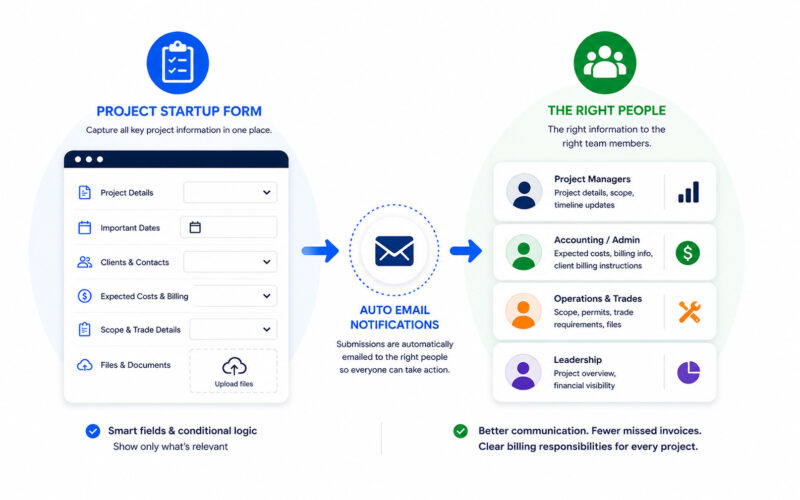
As Process Improvement Manager at Pentillion Construction, I built an internal project startup workflow to close the gap between a project being awarded and the information needed for billing, accounting setup, project management, and office administration.
Before the workflow, important project details could be known by one person but not clearly passed to the other people who needed them. That created risk around expected costs, invoicing, accounting setup, project contacts, permit requirements, file storage, and complex billing situations where costs might be split between property managers, tenants, landlords, or other clients.
I designed the workflow, built the startup form, configured auto-populated dropdowns and conditional logic, tested the process, and set up automatic email submissions to the people who needed the information. The form captured project status, project lead, client and site contacts, expected costs, billing responsibilities, important dates, scope notes, permit requirements, file uploads, and trade-specific details.
The form made the startup process harder to skip and easier to complete. It reduced reliance on memory and one-off messages, helped project managers and office staff see newly awarded work earlier, gave accounting clearer billing instructions, reduced missed invoices, and made complicated billing handoffs easier to manage.
Created a plain-language maintenance performance dashboard that turned a broad property role into clear expectations for ownership, tasks, communication, and professionalism.
Digital Tools & Systems
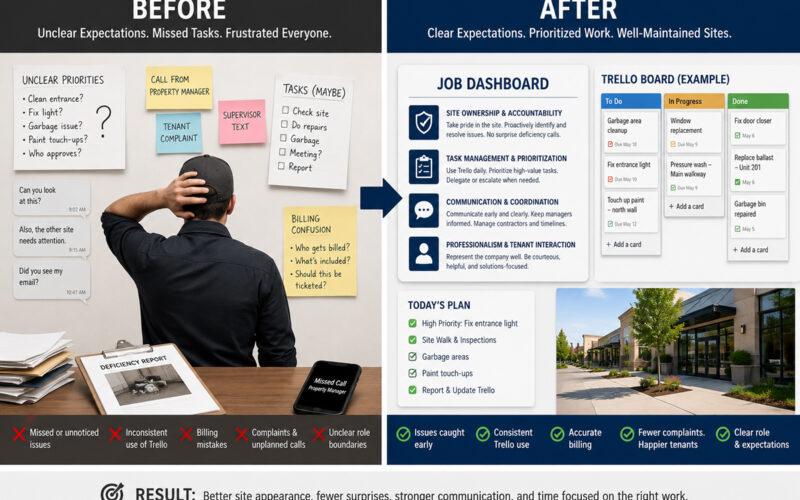
At Pentillion Construction, I created a job dashboard for the Property Maintenance Technician role so expectations were clearer across roughly a dozen commercial properties. The dashboard turned a broad, sometimes thankless maintenance role into four plain-language performance areas with expectations, indicators, and reflection prompts that could support onboarding, coaching, and fairer performance conversations.
The maintenance role covered a wide range of work across outdoor malls, tenant spaces, and mixed-use sites: routine inspections, garbage removal, cleaning, minor repairs, contractor coordination, task tracking, and responses to issues raised by tenants, property managers, and owners. Good maintenance often goes unnoticed, but small visible issues like mud on a front door, overflowing garbage, or damaged finishes can quickly create complaints and reduce confidence in the maintenance team.
I identified that the role needed clearer shared expectations. Technicians were not just completing tasks; they needed to take ownership of their sites, understand priority and billing boundaries, use Trello consistently, communicate before problems escalated, and know when work should be escalated or subcontracted instead of handled in-house.
I created a job dashboard that condensed the role into four key performance areas: Site Ownership & Accountability, Task Management & Prioritization, Communication & Coordination, and Professionalism & Tenant Interaction. Each area included a plain-language summary, detailed expectations, measurable indicators, and reflection prompts that could be used for onboarding, coaching, and performance discussions.
The value was role clarity. The dashboard gave the technician and management a shared reference point for what success in the maintenance technician role looks like. It helped reduce billing mistakes, encouraged more consistent Trello use, improved onboarding, and gave management a fairer way to evaluate performance around the larger operational goal: maintenance should create confidence.